Stop Building Your Firm's Paperwork From Scratch.
84 DONE-FOR-YOU TEMPLATES + 12 INTERACTIVE APPS
Every proposal, engagement letter, onboarding email, pricing sheet and SOP your virtual firm needs, written by a CPA who runs one. Fill in your firm details once, then make each template yours in minutes instead of weekends.
You Know the Work.
You're Tired of Rebuilding the Paperwork.
You can close the books and file the return. But every new client means digging for an old engagement letter, rewriting the same welcome email, and guessing at a price while the prospect waits on the call.
What do I send? What do I say? What do I charge?
The Virtual Firm Ultimate Template ToolKit is for you if:
You're launching your virtual firm and want your documents ready before your first client says yes
You already have clients, but your proposals, letters and emails live in five different places
You're still quoting by the hour because you've never built a real pricing sheet
You spend Sunday nights rewriting emails you've already written a hundred times
You're working through the BluePrint™ and want every template it mentions, done and editable
You want engagement letters, client policies and a WISP to start from instead of a blank page
You're ready for SOPs and AI assistants but don't know where to begin
You'd rather customize than create
And let me be straight with you. This is not a course on how to do accounting, and it's not a legal package. The templates give you a strong, professional starting point. Anything legal, like your engagement letters, policies and WISP, still needs a review by your own attorney for your state.
Picture Every Client Getting the Same Polished Experience, Without You Rebuilding It
A prospect books a call. You open your discovery call script and your lead scorecard. That afternoon they get a proposal in their own words, and three friendly follow-ups go out on schedule.
When they sign, the engagement letter, welcome email, document request and kickoff agenda are already written. Month-end close runs off the same checklist for every client. Your tax season emails are drafted before January.
When a client asks for "just one more thing," you send the out-of-scope quote instead of doing it for free. When it's time to raise your prices, the letter is ready.
You're not working harder. You're just not starting from zero anymore.
INTRODUCING:
THE VIRTUAL FIRM ULTIMATE TEMPLATE TOOLKIT
84 Editable Templates and 12 Interactive Apps to Launch, Sell, Onboard and Run Your Virtual Firm
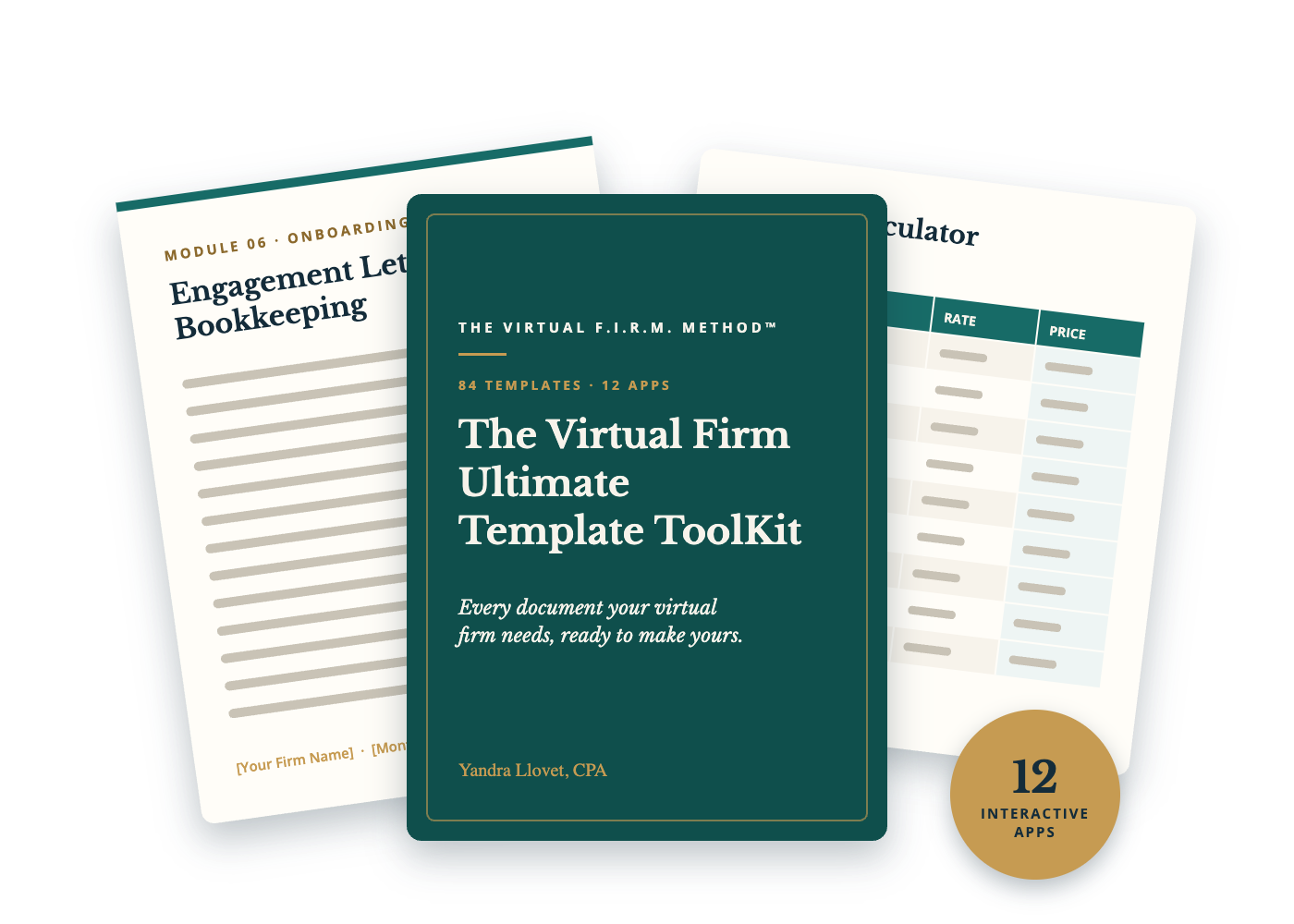
Every template is organized in the order you build your firm, from your launch checklist to your CEO dashboard. Each one is an editable Word or Excel file with instructions, examples and [placeholders] you swap out once with Find & Replace.
Every template has its own short lesson: when to use it, what to customize, your action steps, and the BluePrint™ step it supports. Twelve of them also come with an interactive app that runs right in your browser, from a pricing calculator to an objections practice tool.
These are the documents I use in my own virtual firm, rewritten so you can make them yours.
From Blank Pages to Client-Ready Documents
Before the ToolKit:
Rewriting the same emails for every client
Engagement letters copied from an old job
Pricing on the fly during discovery calls
Scope creep you never bill for
Onboarding that's different every time
No SOPs, so everything lives in your head
Tax season reminders sent by memory
No idea which clients are really profitable
After the ToolKit:
Client emails written once and reused
Engagement letters to customize and have reviewed
A pricing calculator, service menu and fee schedule
An out-of-scope quote email ready to send
The same onboarding checklist for every client
SOP templates and AI assistants to document your work
A tax season calendar, organizers and emails
A client profitability tracker and CEO dashboard
What's Inside the ToolKit

Launch & Setup
Launch checklist, 90-day plan, startup budget, business setup tracker, tech stack builder, CEO command center, WISP and AI use policy.

Pricing & Offers
Pricing calculator, service menu, Good-Better-Best packages, premium package builder, cleanup quote, bookkeeping pricing matrix, tax fee schedule and elevator pitch.

Marketing & Content
Contact list tracker, 20x5 Challenge scripts, networking tracker, website copy, brand kit, social bios, 90-day content calendar, hooks and a lead magnet template.

Sales
Discovery call script, lead scorecard, the Objections Playbook, proposal template, follow-up and ghosted-prospect emails, pipeline tracker, referral and testimonial requests.
Onboarding
Bookkeeping and tax engagement letters, welcome email and guide, onboarding questionnaire, document requests, kickoff agenda, client policies and a 30-day check-in.

Bookkeeping & Tax Delivery
Monthly close checklist, month-end report, cleanup assessment, bank rec SOP, chart of accounts by niche, tax organizers, tax season calendar, emails and planning agenda.

Client Communication, SOPs & AI
Out-of-scope quote, price increase letter, late payment reminders, offboarding letters, SOP templates, workflow map, four AI assistant setups and the 55-prompt AI Workbook.

Trackers, Bonuses & the Bonus Vault
Client profitability tracker, CEO KPI dashboard, international compliance checklist, digital product planner, plus nine Bonus Vault tools for a growing firm.
Your First 4 Weeks With the ToolKit
Set aside an hour or two a week. Use this as a suggested order and adjust it to where your firm is today.
WEEK #1
SET UP YOUR FIRM DETAILS
Fill in your Firm Details sheet once, then customize your launch checklist, startup budget and tech stack. Those answers flow into every template that follows.

WEEK #2
PRICE AND PACKAGE YOUR SERVICES
Run the Pricing Calculator, build your service menu and Good, Better, Best packages, and set your bookkeeping and tax fee schedules.

WEEK #3
READY YOUR SALES AND ONBOARDING
Customize your discovery call script, proposal and follow-ups, then your engagement letters, welcome email and onboarding checklist. Send the legal pieces to your attorney for review.

WEEK #4
SET UP YOUR DELIVERY
Load your monthly close checklist, month-end report, tax season calendar and client emails into your practice software, so every client gets the same process.

THE NEXT 90 DAYS
BUILD YOUR SYSTEMS
Write your first three SOPs, set up an AI assistant, and start tracking client profitability and your monthly numbers. This schedule is a suggestion; your pace depends on your firm, your clients and your time.

Everything You Need to Run Your Firm, Already Written for You
When you get The Virtual Firm Ultimate Template ToolKit, you'll receive lifetime access & all future updates to:
84 editable templates in Word and Excel, organized in 13 modules
12 interactive apps, including a pricing calculator, fee quoter, offer builder, client fit scorecard, objections practice, tax deadline tracker and CEO dashboard
Your Firm Details sheet: fill it in once, then Find & Replace everywhere
A short lesson for every template: when to use it, what to customize and your action steps
The ToolKit Guide: every template mapped to its BluePrint™ step
Engagement letters, client policies, a WISP and an AI use policy to start from (attorney review required)
The Objections Playbook: 32 objections with calm, honest responses
Four Claude Project assistant setups and the 55-prompt AI Workbook
The 9-tool Bonus Vault for growing firms
Every file is yours to edit, brand and reuse in your firm
Plus, every template is reusable.
Customize it once, then use it for every new client, every price increase and every new service you add as your firm grows.
The Bonus Vault: 9 Tools for a Growing Firm
01
Fee Reality Check & Client Right-Sizing
See what every client really pays you per hour, then decide who to keep, reprice or refer out before renewal season.
02
Annual Firm Plan & CEO Retreat
Review your year, set three measurable goals and map the next 12 months, with quarterly check-ins built in.
03
Advisory Opportunity Spotter
Turn the advice you already give for free into a defined, paid service with a name, a scope and a price.
04
Tax Season Safety Nets
A return review checklist for solo preparers and an IRS notice tracker with client emails. Plus feedback, capacity, security and continuity tools.
Hi, I'm Yandra Llovet, CPA
I'm a bilingual CPA (English and Spanish), the owner of YVL Accounting & Tax Advisory, PLLC. I've been in public accounting for over 20 years and running my own virtual CPA firm since 2016.
These aren't templates I pulled off the internet. They're the documents I use in my own firm: the engagement letters, the onboarding emails, the close checklist, the price increase letter. I rewrote every one so you can make it yours, with instructions, examples and placeholders.
I built this ToolKit because the hardest part of running a firm isn't the accounting. It's everything around it. You shouldn't have to build all of that from a blank page like I did.


You Don't Need More Time.
You Need Fewer Blank Pages.
If you're building your firm around a full-time job, a family and a life, every hour counts. That's why every template comes with a short lesson: when to use it, what to customize, and three or four action steps.
Fill in your Firm Details once, and Find & Replace does the rest. Start with the template for the BluePrint™ step you're on. One finished template beats ten downloaded ones.
And the apps do the math for you, from your price floor to which clients are actually profitable.
Your Next 4 Steps to a Firm That Runs on Systems
Step 1: Get the ToolKit
Click the button below and complete checkout to lock in the $157 founding price.
Step 2: Check Your Email
You'll get your login right away, with every lesson, download and app inside the course platform.
Step 3: Fill in Your Firm Details
Start with Lesson 1.3. It takes about 20 minutes and makes every template after it faster.
Step 4: Make Your First Template Yours
Open the template for the step you're on, customize it and save it to your "My Firm Templates" folder.

Your Clients Deserve a Professional Experience. So Do You.
Every new client is a chance to look like the established firm you're building. With the ToolKit, the proposal, the engagement letter, the welcome email and the month-end report are already written. You just make them yours.
You can keep rebuilding documents one client at a time, or start today with 84 templates and 12 apps from a CPA who runs a virtual firm.
Founding price: $157 (regular price $397).
Save yourself the weekends I spent building these. Bet on yourself.
Questions You Might Be Asking Before You Buy
No. The BluePrint™ teaches you how to build your firm, step by step. The ToolKit is the full set of done-for-you documents and apps you customize and use with clients. They work great together, and every template shows the BluePrint™ step it supports, but you can use the ToolKit on its own.
Yes. BluePrint™ students can add the ToolKit for $97. Send me a message and I'll send you the link.
Editable Word (.docx) and Excel (.xlsx) files. They open in Microsoft Word and Excel, Google Docs and Sheets, or Pages and Numbers. The apps run in your web browser, so there's nothing to install.
They're a strong starting point, not legal documents. Every template with legal, tax, privacy or licensing language is flagged, and you should have it reviewed by your own attorney for your state before you use it with clients.
Yes. The templates are written for bookkeepers, tax preparers, EAs and CPAs. Where something depends on your credential, like IRS representation, the template tells you.
No. You need Word or Google Docs and Excel or Google Sheets. Many templates are designed to load into practice software like TaxDome, Karbon or Canopy, but that's optional.
You can use them with your own clients in your firm. The ToolKit is licensed for single-firm use by the original purchaser, so you can't resell, share or redistribute the files.
In your own browser, on your device. Don't enter Social Security numbers, account numbers or other sensitive client data into them.
The ToolKit is text-based. Every template has a short written lesson with action steps: read it, open the file, make it yours.
With Lesson 1.3 (your Firm Details) and the Launch Checklist. The ToolKit Guide shows which templates go with each BluePrint™ step, so you only open what you need.
No. The templates save you time and give you a professional starting point. Your results depend on your experience, effort, implementation and market.
Because the ToolKit is a downloadable digital product, all sales are final.
You get lifetime access, including future updates.

Disclaimer: The Virtual Firm Ultimate Template ToolKit is educational content only and is not legal, tax, or financial advice. The templates are not legal documents; have them reviewed by your own attorney or qualified legal professional before you use them with clients. Results vary based on experience, effort, implementation, and market conditions. No income, client, or business results are guaranteed.
License: Licensed for single-firm use by the original purchaser only. Not for resale, sharing or redistribution.
Affiliate Disclosure: Some templates mention tools I use. If you purchase through my affiliate links, I may earn a commission at no extra cost to you.
Due to this being a downloadable digital product, there is NO refund. ALL SALES ARE FINAL.
©2026 YVL Accounting and Tax Advisory, PLLC | All Rights Reserved